
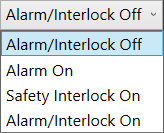
Alarm/Interlock Enable: This is set to OFF by default. The Alarm setting affects the external Warning Light. The Safety Interlock setting affects external power pads, light curtains, and optional Safety Interlock switches that shut down the Analyzer if cabinet doors/lids are opened during testing.
- Alarm On - active for all tests or DC high voltage tests only.
- Safety Interlock On - active for all tests or DC high voltage tests only.
- Alarm/Interlock On - active for all tests or DC high voltage tests only.

Note: The alarm function will always be active for AC testing.
Source: NETS User Manual, Revision D, document 132-06035-0006, section 3.2.8.