
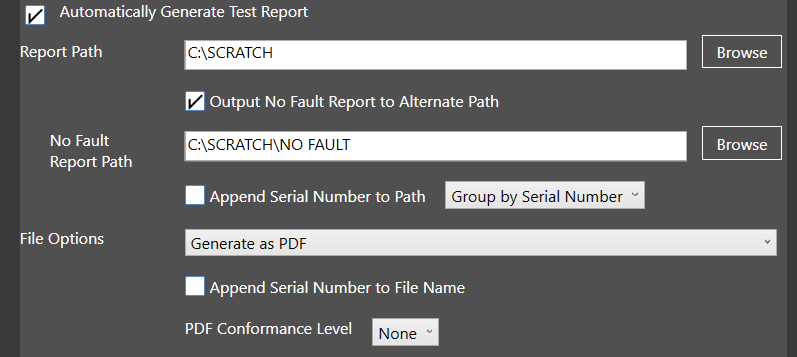
Automatically Generate Test File Report: Check this box to set NETS to automatically generate a test report every time a test script is run.
Report Path: The location where the Default Report will be recorded.
Output No Fault Report to Alternate Path: Saves reports with no faults to a user-defined directory.
Append Serial Number to Path: Adds the Analyzer serial number to the directory where the report is saved. Reports can also be grouped by serial number or test script.
File Options: Choose PDF or Excel for the output file type.
Append Serial Number to File Name: Adds the Analyzer serial number to the file name.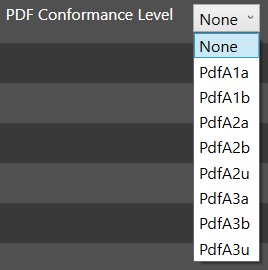
PDF Conformance Level: PDF/A is an ISO-standardized version of the Portable Document Format (PDF) specialized for archiving and long-term preservation of electronic documents. It differs from PDF by prohibiting features unsuitable for long-term archiving, such as font linking (as opposed to font embedding) and encryption. The ISO requirements for PDF/A file viewers include color management guidelines, support for embedded fonts, and a user interface for reading embedded annotations. Users may select variants of conformance levels 1-3.
Source: NETS User Manual, Revision D, document 132-06035-0006, section 7.1.