
Follow these steps to run a test file and access hardware without further use for DitNLA. This will eliminate UDP communications and broadcasts and make working with NETS easier for customer IT departments.
- Follow steps 1-10 in the previous section.
- Finalize the operation by cycling the analyzer power.
- Close DitNLA by right-clicking the icon in the Windows system tray and clicking Close.
- Prevent the DitNLA service from launching at Windows startup (this may require administrative rights).
- Windows 10 and 11 - Right-click the Start button, then navigate to Settings > Apps > Startup and find "DitNLA Application" in the list. Move the slider on the right from "On" to "Off".
- Start NETS and navigate to the Settings screen.
- Under System Access check the box next to "Direct Connection to Analyzer" and verify that the IP address in the box below matches what was entered in DitNLA.
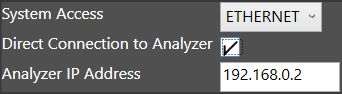
Source: NETS User Manual, Revision D, document 132-06035-0006, section 1.4.4.3.