
Problem: The user cannot see the "Open" option (seen on the left) when right-clicking on the DitNLA icon.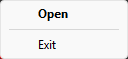
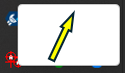
Solution: Click in the blank area where the Open option is normally available, and DitNLA will open.
Source: NETS User Manual, Revision D, document 132-06035-0006, section 11.1.1.