
| Item | Description |
|---|---|
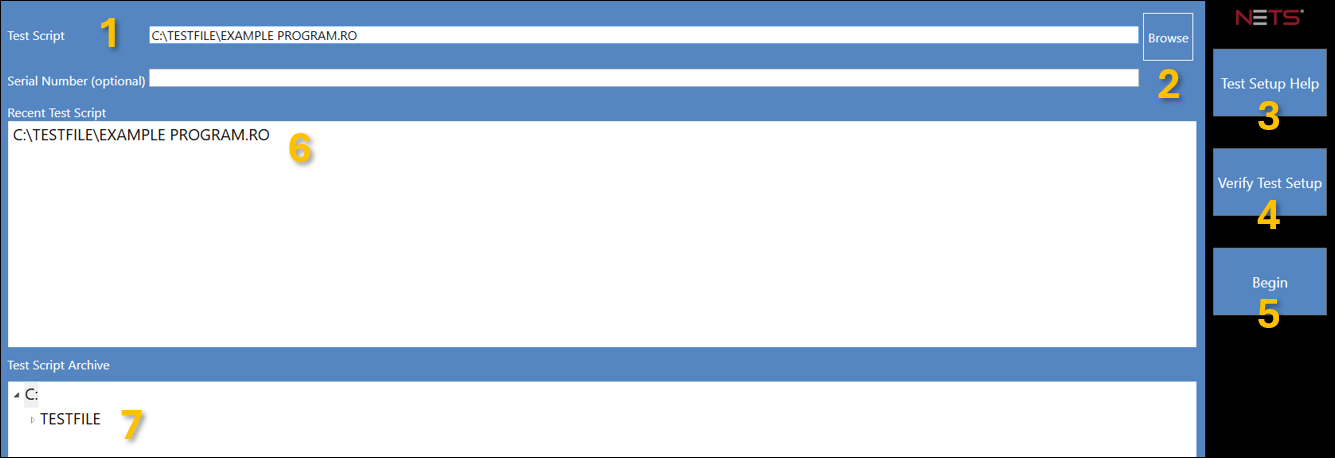
| 1. Data Entry Fields | Enter the Test Script location and an optional Serial Number. |
| 2. Browse Button | Click to navigate to a Test Script location. |
| 3. Test Setup Help | Click to open the Test Setup Help window and select a help file to associate with the Test Script. |
| 4. Verify Test Setup | Click to verify that all UUT connectors are secured in place. |
| 5. Begin | Click to open the Test Control Panel. |
| 6. Recent Test Script | Select a Test Script from a list of recently executed tests. |
| 7. Test Script Archive | Select a Test Script from the C:\TESTFILE directory, including all subdirectories. |
Source: NETS User Manual, Revision D, document 132-06035-0006, section 5.1.