
Double-click on the NETS program icon. The initial NETS logon requires Administrator-level access to establish some settings before connecting with the Analyzer. The graphic below shows the configuration settings.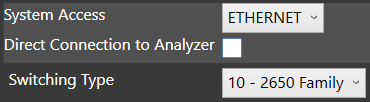
Follow these steps to configure the system:
- Log on as Administrator. The User Name is "admin" and the Password is "ditmco". Changing the default Administrator account is recommended and covered in NETS Configuration Settings.
- Click on the "Settings" button.
- Click the drop-down box next to System Access to choose the appropriate hardware connection.
EPP
SPP
Ethernet
EPP Dongle - If connecting directly to the Computer using its Ethernet port, and not over a network, place a checkmark in the box next to Direct Connection to Analyzer.
- Click the drop-down box next to Switching Type to choose the correct switching series. Most will use Series 10 (2650/2635) or Series 17 (2115) switching.
- Click the "Save" button in the bottom right corner of the screen to commit the changes.
- If the connection method is Ethernet, then exit NETS to configure the connection with DitNLA. If connecting using any other method, continue to NETS Configuration Settings to finish setting up the Analyzer.
Note:If the system uses Series 10 switching, then a Distributed Switching Configuration (DSC) file must be created so that NETS has the correct addressing information. See System Maintenance for instructions on building a DSC file using the DIT-MCO Toolbox utility.
Source: NETS User Manual, Revision D, document 132-06035-0006, section 1.4.3.