
This feature assists users when verifying the test setup connections by performing a Product Hookup Test before a test has been started. Selecting the Verify Test Setup button ensures all needed connectors are in place before starting a test. The Verify Test Setup function causes the software to create a subset of the test script that looks for the connectors called for in the (.RO) and (.ACT) files. If a connector that should be connected to the Analyzer is not found, the program issues a message regarding the missing connector. This feature helps identify missing or damaged connectors before executing the primary test. Testing may continue even though the Product Hookup Test has failed. For example, the test used to verify a connector has reason to fail under certain conditions and for some known reason.
If a Test Script was previously used with Verify Test Setup, NETS will ask users if they would like to restore a previous session or start a new one.
To use Verify Test Setup, users need an ACT file and at least one continuity parameter statement in the Test Script. Users will receive an error message if either or both of these are missing.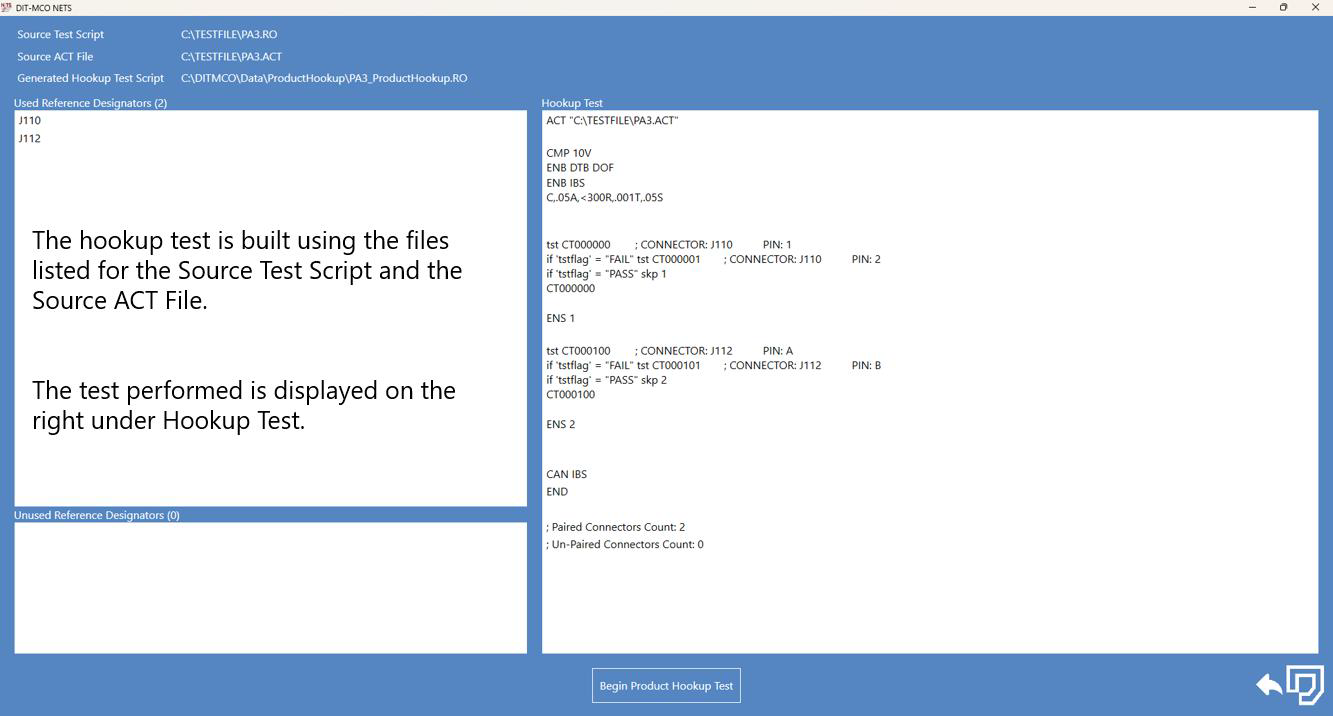
Click the Begin Product Hookup Test button to open the Test Control Panel and execute the test.
Source: NETS User Manual, Revision D, document 132-06035-0006, section 5.3.